Vadovas Hotpoint HR 632 B Kaitlentė

Reikia vadovo savo Hotpoint HR 632 B Kaitlentė? Žemiau galite nemokamai peržiūrėti ir atsisiųsti PDF vadovą lietuvių kalba. Šiuo metu šis produktas turi 3 dažniausiai užduodamus klausimus, 0 komentarų ir 0 balsų. Jei tai ne tas vadovas, kurio norite, susisiekite su mumis.

Jūsų gaminys sugedęs, o vadove nėra jokio sprendimo? Eikite į Repair Café ir gaukite nemokamas remonto paslaugas.

Vadovas

Loading…
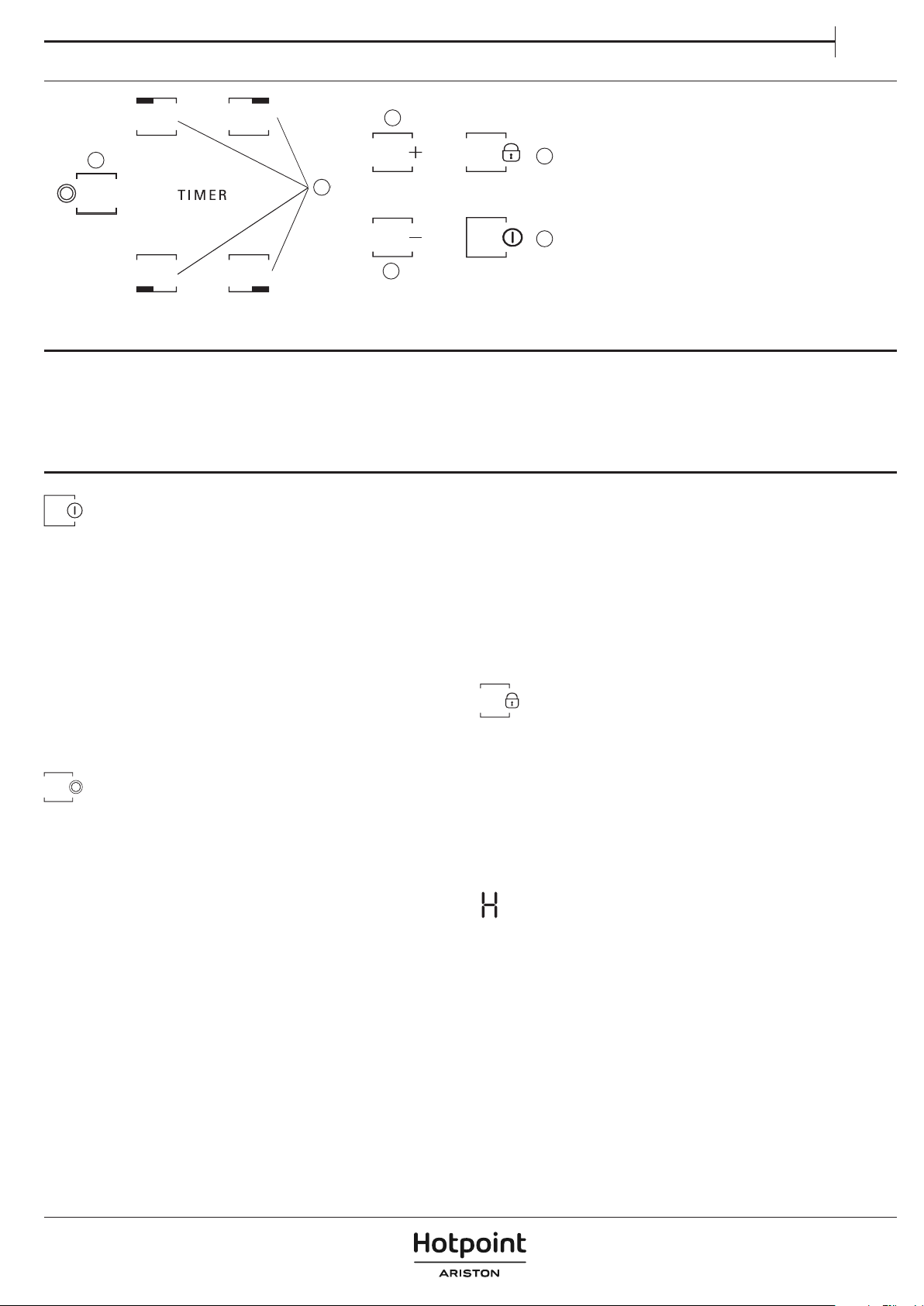
CONTROL PANEL
DAILY USE
SWITCHING THE HOB ON/OFF
To switch the hob on, keep button “A“ pressed for approx. 2 seconds.
The 4 cooking zone displays show “0. If within 20 seconds none of the
cooking zones is activated, the hob switches o automatically as a safety
precaution.
SWITCHING ON AND ADJUSTING COOKING ZONES
Press one of the buttons “B“ corresponding to the cooking zone you
intend to use. Select the heat setting required with buttons “E“ or “C“.
The other selectable cooking settings go from 1 to 9. Press buttons “+/−“
at the same time to cancel all settings.
IMPORTANT: the control is deactivated 10 seconds after the heat setting has
been selected.
To change the heat setting, rst press the selection button “B“ again, then
proceed to change the setting, using buttons “E“ or “C“.
MULTIPLE ZONE
After selecting the desired zone and setting the level (as described in
the previous section) press “F“: an indicator above the button turns
on,activating the additional zone.
The multiple zone can only be used if:
The cooking zone is provided with multiple zone;
The power level selected is greater than 0.
To deactivate the multiple zone, press button “B“ of the desired zone,
then press “F“ again.
TIMER
To set the Timer function, select the desired cooking zone and power
setting then press the cooking zone key again and a luminous dot
will appear on the display of the timer-controlled cooking zone. The
indication “00“ blinks on the 2 displays. Press buttons “C“ or “E“ to set
the time from 1 to 99.
IMPORTANT: after 10 seconds the timer displays will show the power
setting of the other cooking zones.
To view the remaining cooking time, press the timer-controlled cooking
zone key twice.
A FUNCTION
This function allows to automatically decrease the cooking zone power
level from the highest value (level 9) to the one selected by the user for
a later stage of cooking.
To activate this function rst press the “+“ button when level 9 is reached.
The display shows “A“ and “9“ ashes alternately with low brightness.
At this point, choose the desired power level (less than 9) with the “–“
button.
A“ and selected level ash alternately with low brightness on the display.
The function is activated once “A“ and the selected level ash alternately
with high brightness on the display.
Once “A“ is no longer visible on the display (the “A“ function switches o
automatically after several minutes, depending on the set power level),
the cooking process continues with lower power and the display shows
only the selected power level.
N.B.: this function is not possible with level 9.
KEY LOCK
The Key lock function is switched on by holding down button “D“ until
a dot lights up above the function button. The control panel is locked
except for the switching-o function. The function remains on even after
the hob is switched o and on again and can be deactivated by pressing
button “D“ again until the dot above the function button goes o.
When the hob is o with the key lock activated to switch the hob on, rst
deactivate the key lock function by pressing button “D“ again until the
dot above the function button goes o.
The presence of water, liquid spilled from pots or any objects resting on
the controls can accidentally activate or deactivate the Key lock function.
RESIDUAL HEAT INDICATOR
When the cooking zone is switched o, the residual heat indicator “H“
remains on or ashes alternating with “0“ until the temperature of the
hob returns within safety levels.
IMPORTANT: The hob’s safety features include an automatic switching
o function. Prolonged use of the same heat setting triggers automatic
switch-o of the cooking zone (for example, after around 1 hour at
maximum heat setting, the cooking zone switches o).
IMPORTANT: To avoid a permanent damage the hob:
do not use pots with bottoms that are not at;
do not use metal pots with enamelled bottom;
do not place hot pots/pans over the control panel.
FIRST TIME USE
Upon the rst installation, the control panel performs a functional test for
about 1 second, after which it automatically switches to the “Key lock“
function.
To deactivate the function, press and hold button “D“; an acoustic signal
will sound, and the corresponding led will turn o.
NOTE: If a reset occurs, repeat the procedure described above.
F
B
E
C
D
A
A On/O
B Cooking zone and timer selection
C-E Heat setting increase and decrease
D Key lock
F
Multiple zone Activation / Deactivation
EN
Atsisiųsti vadovą lietuvių kalba (PDF, 2.5 MB)
(Tausokite gamtą ir spausdinkite šį vadovą tik tada, kai tai tikrai būtina)

Loading…

Įvertinimas

Praneškite mums, ką manote apie Hotpoint HR 632 B Kaitlentė, pateikdami produkto įvertinimą. Norite pasidalyti savo patirtimi apie šį produktą arba užduoti klausimą? Palikite komentarą puslapio apačioje.
Ar esate patenkinti Hotpoint HR 632 B Kaitlentė?
Taip Ne
Būkite pirmieji įvertinę šį produktą
0 balsai

Prisijunkite prie pokalbio apie šį produktą

Čia galite pasidalinti savo nuomone apie Hotpoint HR 632 B Kaitlentė. Jei turite klausimų, pirmiausia atidžiai perskaitykite vadovą. Užklausą dėl vadovo galite pateikti naudodami mūsų kontaktinę formą.

Daugiau apie šį vadovą

Suprantame, kad puiku turėti popierinį savo Hotpoint HR 632 B Kaitlentė vadovą. Visada galite atsisiųsti vadovą iš mūsų svetainės ir atsispausdinti patys. Jei norite turėti originalų vadovą, rekomenduojame susisiekti su Hotpoint. Jie gali pateikti originalų vadovą. Ar ieškote savo Hotpoint HR 632 B Kaitlentė vadovo kita kalba? Pasirinkite pageidaujamą kalbą mūsų pagrindiniame puslapyje ir ieškokite modelio numerio, kad pamatytumėte, ar jį turime.

Specifikacijos

Prekės ženklas Hotpoint
Modelis HR 632 B
Kategorija Kaitlentės
Failo tipas PDF
Failo dydis 2.5 MB

Visi Hotpoint Kaitlentės vadovai
Daugiau Kaitlentės vadovų

Dažnai užduodami klausimai apie Hotpoint HR 632 B Kaitlentė

Mūsų palaikymo komanda ieško naudingos informacijos apie produktą ir atsakymų į dažniausiai užduodamus klausimus. Jei dažniausiai užduodamuose klausimuose pastebėjote netikslumų, praneškite mums naudodamiesi mūsų kontaktų forma.

Kokias keptuves galima naudoti ant indukcinės kaitlentės? Patvirtinta

Paprastai ant indukcinės kaitlentės gali būti naudojamos visos magnetinės keptuvės. Beveik visos naujos keptuvės yra tinkamos indukcijai.

Tai buvo naudinga (1509) Skaityti daugiau

Mano kaitlentės maitinimo kištukas netelpa į įprastą lizdą, ką turėčiau daryti? Patvirtinta

Daugelis elektrinių kaitlenčių (ir keraminių, ir indukcinių) turi skirtingą kištuką. Taip yra todėl, kad šiems prietaisams reikia daug energijos. Prietaisą montuoti turi atlikti profesionalai.

Tai buvo naudinga (1496) Skaityti daugiau

Kodėl mano diapazone esantis uždegimas skleidžia spragtelėjimą? Patvirtinta

Jei diapazonas buvo išvalytas dideliu kiekiu vandens, rankenėlės galėjo sušlapti ir suaktyvinti uždegimą. Leiskite rankenėlėms išdžiūti. Jei problema išlieka, turėtumėte susisiekti su gamintoju.

Tai buvo naudinga (1272) Skaityti daugiau
Vadovas Hotpoint HR 632 B Kaitlentė

Susiję produktai

Susijusios kategorijos

×
Download