Vadovas EMOS E8737 Meteorologijos stotis

Reikia vadovo savo EMOS E8737 Meteorologijos stotis? Žemiau galite nemokamai peržiūrėti ir atsisiųsti PDF vadovą lietuvių kalba. Šiuo metu šis produktas turi 5 dažniausiai užduodamus klausimus, 2 komentarų ir turi 2 balsų, kurių vidutinis produkto įvertinimas yra 100/100. Jei tai ne tas vadovas, kurio norite, susisiekite su mumis.

Jūsų gaminys sugedęs, o vadove nėra jokio sprendimo? Eikite į Repair Café ir gaukite nemokamas remonto paslaugas.

Vadovas

Loading…
4
Manual setting of time and date
1. Press and hold the TIME button.
2. Use the UP/DOWN buttons to set: year - date format - month - day - 12/24 time format - hour - minute - time zone.
3. Press TIME to move between the items.
English calendar abbreviations are as follows:
SUN – Sunday, MON – Monday, TUE – Tuesday, WED – Wednesday, THU – Thursday, FRI – Friday, SAT - Saturday
If during the process of setting no button is pressed for 8 seconds, the main display of time will return.
Indoor and outdoor temperature, humidity, unit of temperature
Indoor temperature and humidity are displayed to the right of the IN icon.
Outdoor temperature and humidity are displayed to the right of the OUT icon.
Press and hold the UP button to select the °C/°F unit of temperature.
Cyclic display of values from connected sensors
If you have connected more sensors, press the CH button repeatedly – the icon will be displayed under the sensor No.
The weather station will display the values from all connected sensors in a loop (5 second interval).
Press the CH button repeatedly to cancel the cycle mode; the icon will not be displayed.
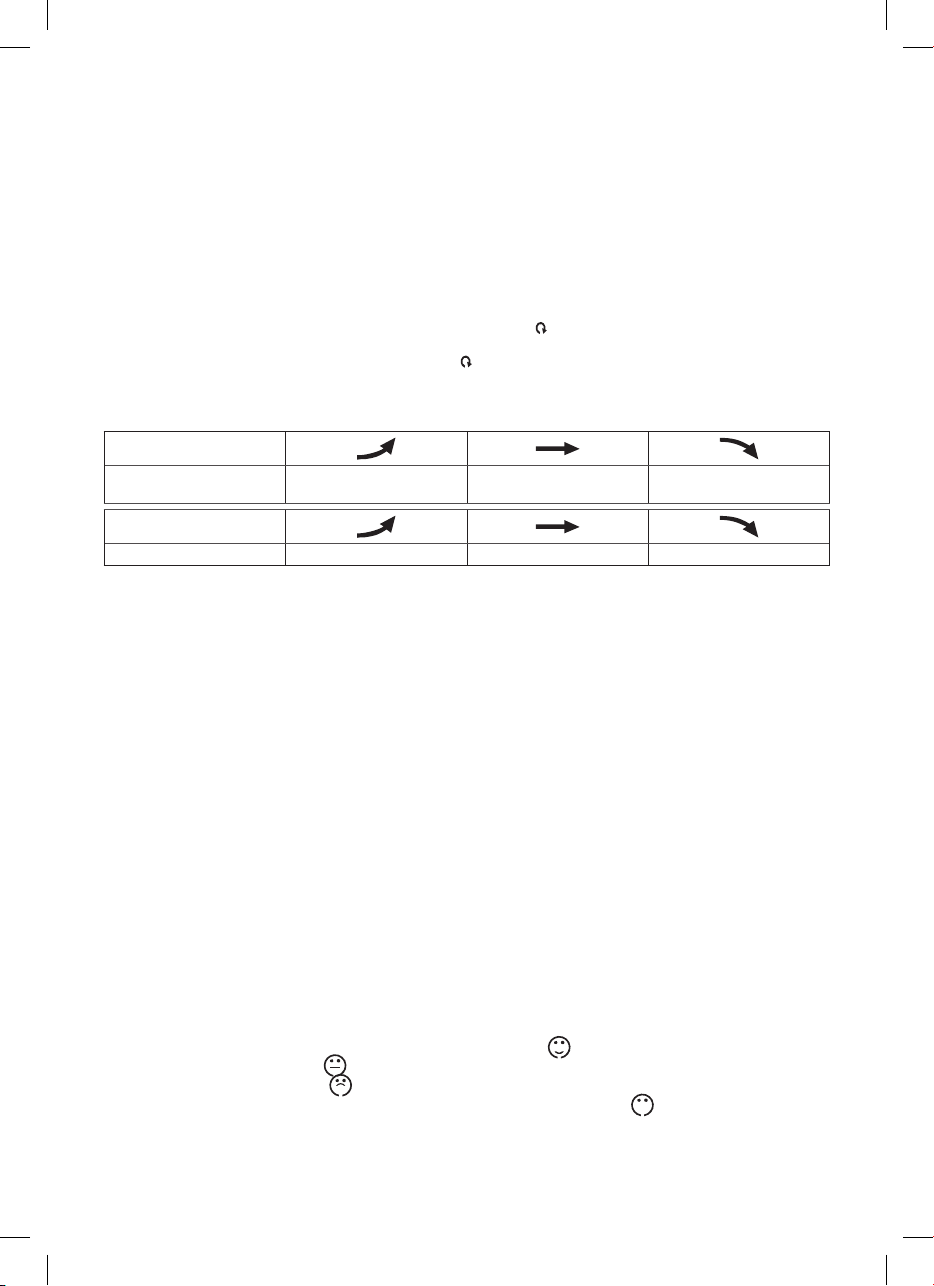
Temperature, humidity and pressure trends
The arrow indicates the trend of temperature measurement readings on a specic sensor or weather station.
The weather station also displays pressure trend.
Indication on the display
Temperature and humidity
trends
Rising Constant Falling
Indication on the display
Pressure trend Rising Constant Falling
Atmospheric pressure - history and chart
Atmospheric pressure in hPa/mb units and animated pressure history chart for the last 12 hours is displayed in the eld.
Press and hold the UP button to display the inHg units of pressure.
Moving the weather station to another place will aect the measured values.
Measurement will stabilise within 12 hours of battery insertion or weather station moving.
Setting an alarm
2 alarms can be set on the weather station.
Use the ALM button to select the A1 or A2 alarm. The selection will be displayed at bottom right area of the display next to
the display of time.
Press and hold ALM and use UP/DOWN buttons to set the desired time of alarm.
Press the ALM button to move between the items.
Press the UP button repeatedly to activate the alarm.
The alarm icon will be displayed with the text A1 or A2, or both.
Press the UP button again to deactivate the alarm; the icon disappears.
Snooze and display backlight functions
Use the SNZ button to delay alarm ringing by 8 minutes.
Press it when it starts ringing. Alarm icon 1, 2 + Zz will ash.
To cancel the SNOOZE function, press any button on the back side of the weather station – the icon stops ashing and remains
displayed.
The alarm will be re-activated next day.
The alarm will be active for 2 minutes, if no button is pressed.
Press and hold the SNZ button and UP/DOWN buttons to set the delay time of the snooze function within 5–30 min.
Use the SNZ button to conrm the delay time you have set.
Press the SNZ button to activate blue display backlight for 8 seconds.
When the set temperature limit is exceeded, an audio alarm will sound and the measured value starts ashing.
Nice environment icon - smiley
If humidity is within 40–70 % RH and the temperature within 20–25.9°C, the icon (nice environment) will be displayed.
If humidity is lower than 40 % RH, the
icon (dry environment) will be displayed.
If humidity is higher than 70 % RH, the
icon (wet environment) will be displayed.
If the temperature is not within 20–25.9°C and humidity is not within 40–70% RH, only the
icon will be displayed.
Weather forecast
The station forecasts weather on the basis of changes in atmospheric pressure for the next 12–24 hours for an area within the
range of 15–20 km. The forecast accuracy is within 70–75 %. As the weather forecast may not always be 100% accurate neither
Atsisiųsti vadovą lietuvių kalba (PDF, 0.97 MB)
(Tausokite gamtą ir spausdinkite šį vadovą tik tada, kai tai tikrai būtina)

Loading…

Įvertinimas

Praneškite mums, ką manote apie EMOS E8737 Meteorologijos stotis, pateikdami produkto įvertinimą. Norite pasidalyti savo patirtimi apie šį produktą arba užduoti klausimą? Palikite komentarą puslapio apačioje.
Ar esate patenkinti EMOS E8737 Meteorologijos stotis?
Taip Ne
100%
0%
2 balsai

Prisijunkite prie pokalbio apie šį produktą

Čia galite pasidalinti savo nuomone apie EMOS E8737 Meteorologijos stotis. Jei turite klausimų, pirmiausia atidžiai perskaitykite vadovą. Užklausą dėl vadovo galite pateikti naudodami mūsų kontaktinę formą.

s 25-12-2023
X

atsakyti | Tai buvo naudinga (1) Skaityti daugiau (Išvertė Google)
s 25-12-2023
X

Tai buvo naudinga (0) (Išvertė Google)

Daugiau apie šį vadovą

Suprantame, kad puiku turėti popierinį savo EMOS E8737 Meteorologijos stotis vadovą. Visada galite atsisiųsti vadovą iš mūsų svetainės ir atsispausdinti patys. Jei norite turėti originalų vadovą, rekomenduojame susisiekti su EMOS. Jie gali pateikti originalų vadovą. Ar ieškote savo EMOS E8737 Meteorologijos stotis vadovo kita kalba? Pasirinkite pageidaujamą kalbą mūsų pagrindiniame puslapyje ir ieškokite modelio numerio, kad pamatytumėte, ar jį turime.

Specifikacijos

Prekės ženklas EMOS
Modelis E8737
Kategorija Meteorologijos stotys
Failo tipas PDF
Failo dydis 0.97 MB

Visi EMOS Meteorologijos stotys vadovai
Daugiau Meteorologijos stotys vadovų

Dažnai užduodami klausimai apie EMOS E8737 Meteorologijos stotis

Mūsų palaikymo komanda ieško naudingos informacijos apie produktą ir atsakymų į dažniausiai užduodamus klausimus. Jei dažniausiai užduodamuose klausimuose pastebėjote netikslumų, praneškite mums naudodamiesi mūsų kontaktų forma.

Mano meteorologinė stotis numatė, kad lietus, bet taip neatsitiko. Kodėl taip? Patvirtinta

Meteorologinės stoties prognozė pagrįsta oro slėgiu. Apskritai žemas slėgis reiškia blogą orą, o aukštas – gerą orą. Gali būti, kad oro sąlygos vystysis kitaip, nei prognozuoja oro slėgis.

Tai buvo naudinga (1469) Skaityti daugiau

Kurioje vietoje geriausia oro stotis ir jos jutikliai? Patvirtinta

Pati orų stotis yra viduje ir turi būti atokiau nuo šilumos šaltinių, tokių kaip virtuvė, langai ar elektros prietaisai. Atskiras lauko temperatūros jutiklis turi būti pastatytas šešėlyje ir bent 1,25 m virš žemės. Lietaus jutiklį reikia pastatyti atviroje vietoje, kur jis visada galėtų surinkti lietų. Vėjo jutiklį taip pat reikia pastatyti atviroje vietoje, kur yra kliūčių, turinčių įtakos vėjui.

Tai buvo naudinga (395) Skaityti daugiau

Mano meteorologinėje stotyje yra lietaus matuoklis, ar jis taip pat gali išmatuoti iškritusį sniegą? Patvirtinta

Kai kuriuose lietaus matuokliuose yra kaitinimo elementas, kuris tirpdo sniegą ir leidžia jį išmatuoti. Be kaitinimo elemento lietaus matuoklis užsikimš ir nebus galima atlikti matavimų.

Tai buvo naudinga (282) Skaityti daugiau

Ar galiu ilgą laiką palikti keičiamą bateriją įrenginyje? Patvirtinta

Keičiamos baterijos gali likti įrenginyje ilgą laiką, jei prietaisas yra naudojamas. Kai prietaisas laikomas ilgą laiką, patartina išimti baterijas, kad išvengtumėte oksidacijos.

Tai buvo naudinga (282) Skaityti daugiau

Mano įrenginio baterija oksiduota, ar vis tiek galiu saugiai ją naudoti? Patvirtinta

Taip, įrenginį vis tiek galima saugiai naudoti. Pirmiausia išimkite oksiduotą akumuliatorių. Niekada tai nenaudokite plikomis rankomis. Tada nuvalykite akumuliatoriaus skyrių vatos tamponu, suvilgytu acte arba citrinos sultimis. Leiskite jam išdžiūti ir įdėkite naujas baterijas.

Tai buvo naudinga (280) Skaityti daugiau
Vadovas EMOS E8737 Meteorologijos stotis

Susiję produktai

Susijusios kategorijos

×
Download